리눅스 서버 용량 확인방법
IT 컴퓨터 | 2026년 10월 01일 00시 07분
리눅스 서버 용량을 확인하는 명령어는 2가지가 있다. df, du 명령어가 리눅스를 대표하는 용량 확인 명령어이다. 사용방법도 쉬우며, 레드햇 리눅스 데비안 리눅스 상관없이 사용할 수 있는 명령어이기 때문에 꼭 알아두면 좋다.
리눅스 서버를 운영하거나 리눅스를 사용중에 있다면 항상 용량 확인을 습관적으로 할 수 밖에 없어서 df, du 명령어를 기본적으로 알고 있으면 좋다.
[lwptoc]
 df -h
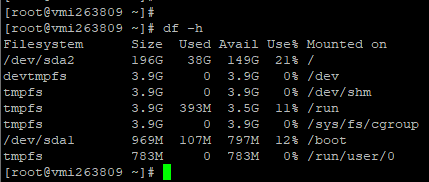
가장 많이 사용하는 명령어이다. 현재 리눅스 서버의 전체 디스크용량을 확인할 수 있으며 G,M,K별로 용량 구분을 해서 확인할 수 있는게 특징이다.
df -h
가장 많이 사용하는 명령어이다. 현재 리눅스 서버의 전체 디스크용량을 확인할 수 있으며 G,M,K별로 용량 구분을 해서 확인할 수 있는게 특징이다.
 df -a
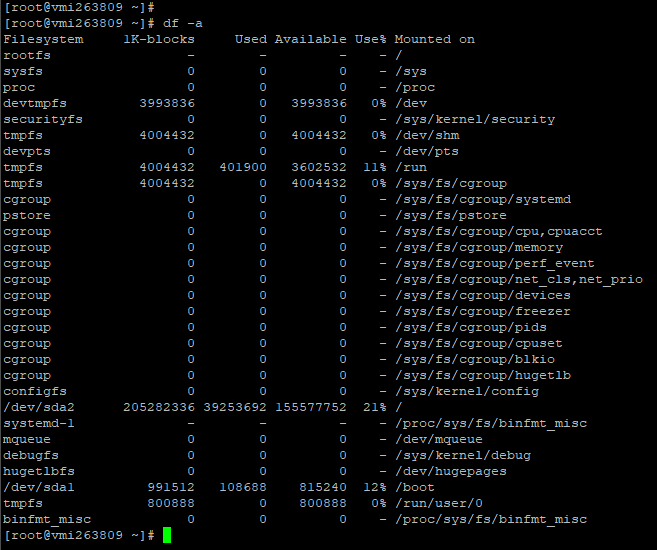
리눅스 파일 시스템의 모든 용량을 세부적으로 확인할 수 있다.
df -a
리눅스 파일 시스템의 모든 용량을 세부적으로 확인할 수 있다.
 df
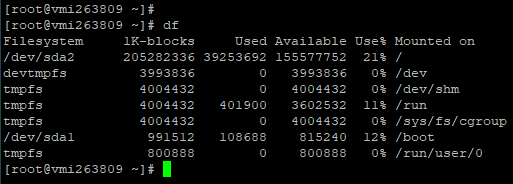
옵션 없이 가장 기본이 되는 명령어이다. 다소 육안으로 볼때 디스크 용량을 확인하는것이 부담스럽다. 하지만 세밀하게 용량 확인이 가능하다는 장점이 있다.
df
옵션 없이 가장 기본이 되는 명령어이다. 다소 육안으로 볼때 디스크 용량을 확인하는것이 부담스럽다. 하지만 세밀하게 용량 확인이 가능하다는 장점이 있다.
 df -m
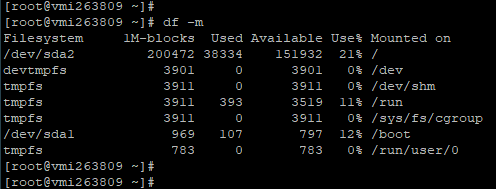
1M당 사이즈를 정리해서 보여주는 방식이다. 기본옵션보다는 보기 편하다.
대략 이정도의 명령어가 있으며 가장 많이 사용하는 명령어 옵션은
df -h
이것만 알고 있으면 된다.
df -m
1M당 사이즈를 정리해서 보여주는 방식이다. 기본옵션보다는 보기 편하다.
대략 이정도의 명령어가 있으며 가장 많이 사용하는 명령어 옵션은
df -h
이것만 알고 있으면 된다.
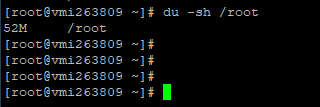 du -sh /root/
/root 디렉토리의 총 용량을 한 번에 확인할 수 있는 명령어다.
du -sh /root/
/root 디렉토리의 총 용량을 한 번에 확인할 수 있는 명령어다.
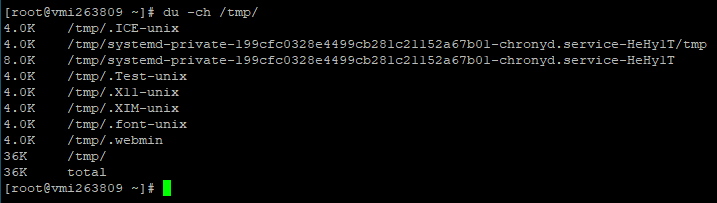 du -ch /tmp/
/tmp 하위디렉토리의 용량을 각각 확인할 수 있으며 total 용량까지도 확인이 가능하다.
du -ch /tmp/
/tmp 하위디렉토리의 용량을 각각 확인할 수 있으며 total 용량까지도 확인이 가능하다.
리눅스 df 명령어 사용법
1) 서버 전체 용량 보기 좋게 확인하기
df -h
가장 많이 사용하는 명령어이다. 현재 리눅스 서버의 전체 디스크용량을 확인할 수 있으며 G,M,K별로 용량 구분을 해서 확인할 수 있는게 특징이다.
2) 모든 디스크 용량 세부적으로 확인
df -a
리눅스 파일 시스템의 모든 용량을 세부적으로 확인할 수 있다.
3) 옵션 없이 사용
df
옵션 없이 가장 기본이 되는 명령어이다. 다소 육안으로 볼때 디스크 용량을 확인하는것이 부담스럽다. 하지만 세밀하게 용량 확인이 가능하다는 장점이 있다.
4) 1M당 사이즈로 보기
df -m
1M당 사이즈를 정리해서 보여주는 방식이다. 기본옵션보다는 보기 편하다.
대략 이정도의 명령어가 있으며 가장 많이 사용하는 명령어 옵션은
df -h
이것만 알고 있으면 된다.
5) df 명령어 옵션
Usage: df [OPTION]... [FILE]... Show information about the file system on which each FILE resides, or all file systems by default. Mandatory arguments to long options are mandatory for short options too. -a, --all include pseudo, duplicate, inaccessible file systems -B, --block-size=SIZE scale sizes by SIZE before printing them; e.g., '-BM' prints sizes in units of 1,048,576 bytes; see SIZE format below --direct show statistics for a file instead of mount point --total produce a grand total -h, --human-readable print sizes in human readable format (e.g., 1K 234M 2G) -H, --si likewise, but use powers of 1000 not 1024 -i, --inodes list inode information instead of block usage -k like --block-size=1K -l, --local limit listing to local file systems --no-sync do not invoke sync before getting usage info (default) --output[=FIELD_LIST] use the output format defined by FIELD_LIST, or print all fields if FIELD_LIST is omitted. -P, --portability use the POSIX output format --sync invoke sync before getting usage info -t, --type=TYPE limit listing to file systems of type TYPE -T, --print-type print file system type -x, --exclude-type=TYPE limit listing to file systems not of type TYPE -v (ignored) --help display this help and exit --version output version information and exit Display values are in units of the first available SIZE from --block-size, and the DF_BLOCK_SIZE, BLOCK_SIZE and BLOCKSIZE environment variables. Otherwise, units default to 1024 bytes (or 512 if POSIXLY_CORRECT is set). SIZE is an integer and optional unit (example: 10M is 10*1024*1024). Units are K, M, G, T, P, E, Z, Y (powers of 1024) or KB, MB, ... (powers of 1000). FIELD_LIST is a comma-separated list of columns to be included. Valid field names are: 'source', 'fstype', 'itotal', 'iused', 'iavail', 'ipcent', 'size', 'used', 'avail', 'pcent', 'file' and 'target' (see info page). GNU coreutils online help: <http://www.gnu.org/software/coreutils/> For complete documentation, run: info coreutils 'df invocation'리눅스 du 명령어 사용법
1) 디렉토리별 간편하게 총 용량 확인
du -sh /root/
/root 디렉토리의 총 용량을 한 번에 확인할 수 있는 명령어다.
2) 하위디렉토리별 각각의 용량 확인
du -ch /tmp/
/tmp 하위디렉토리의 용량을 각각 확인할 수 있으며 total 용량까지도 확인이 가능하다.